Click on images to see them in full screen
smsLINES
smsLINES is a component of smsPULSE MM. It manages message queues for a number of protocols and communicates with both the smsPULSE and smsROUTER add-ins. smsLINES is not required if you use smsPULSE outbound SMS over HTTPS only.
From version 7.5 smsLINES improves on its TAPI discovery, in the following way:
- MM1 Communication Lines which refer to TAPI modems which do not exist on the server are ignored
- TAPI devices that are found on the server will cause smsLINES to create these as MM1 Communication Lines on the database. You can then continue to edit those
- If a TAPI device conflicts with another device (say because the same COM port is used), smsLINES will not create a Communication Line for such a device. smsLINES attempts to perform a basic health check on every line it creates
- You can also disable smsLINES line alerts. See below.
Tasks performed by smsLINES:
- Send and receive SMS over GSM devices and other future protocols
- Monitor device health and alert administrators of any emerging issues
- Distribute messages to queues
- Track delivery confirmation of messages and pass to smsPULSE for notifications
- Handle an array of devices, COM (RS-232) and Windows TAPI. For MMS you must define your modem as a TAPI device in Windows 2003 and above
- Provide testing and licensing facilities via Communication Lines documents
A new database named sms.RAWQUE is used by the software
Console Commands
You may issue console command using the Web UI:
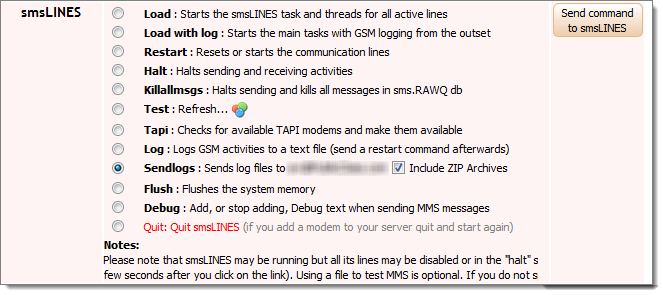 To run smsLINES type: "load smslines" at the server console. The program will be normally started automatically by smsPULSE when it starts.
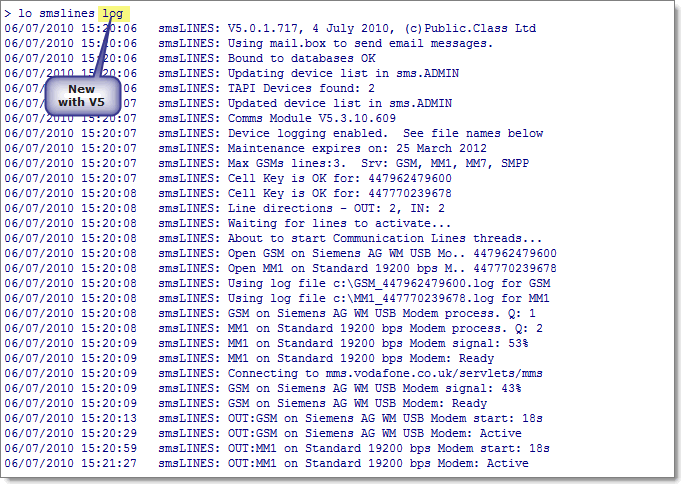
From smsPULSE Version 5 you may start smsLINES with device logging enabled from the outset. Type "load smslines log".
From Version 7.7.0 you may start smsLINES with the "nowait" option, which will cause smsLINES not to wait before it start processing outbound messages.
To run smsLINES type: "load smslines" at the server console. The program will be normally started automatically by smsPULSE when it starts.
From smsPULSE Version 5 you may start smsLINES with device logging enabled from the outset. Type "load smslines log".
From Version 7.7.0 you may start smsLINES with the "nowait" option, which will cause smsLINES not to wait before it start processing outbound messages.
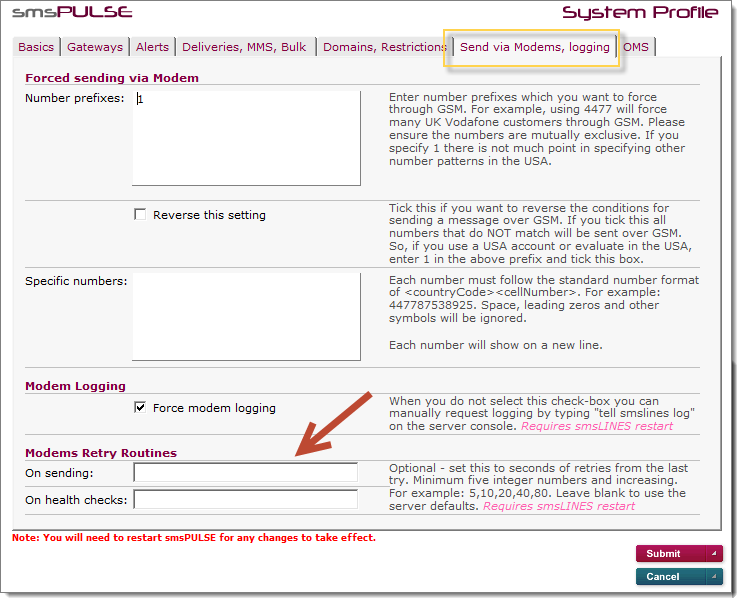
 From version 8.1.5 of smsLINES you can set the server to force logging from the system profile, allowing logging to take place without the need to remember to turn it on.
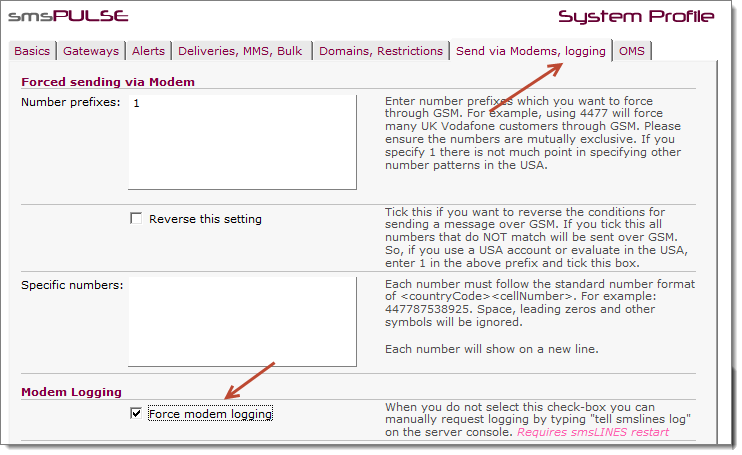 and in the Web UI...
 smsLINES from V8
From this release of smsPULSE and smsLINES within it, a major technology change was introduced. The change mainly affected users who enable MMS services but is also available for users of GSM with normal SMS. If you define any line to be MMS a new Windows Service will be used, and if you use SMS only you may choose to force usage of the service, through the system profile. The smsLINES MMS service is always used when you define MMS lines.
Please note that you can override the default location of the smsLINES Service by setting the environment variable SMSLINES_SVC_PATH in the server's notes.ini file. This variable makes it possible to have more then one installation of the server on the same machine (say a 32bit and 64bit servers), and at the same time share the service. For example the line in notes.ini could look like this: SMSLINES_SVC_PATH=c:\smspulse\service . This directory should contains, amongst others, the directories bin and conf. Of course the Windows Service for smsLINES MMS must have been set to the same folder.
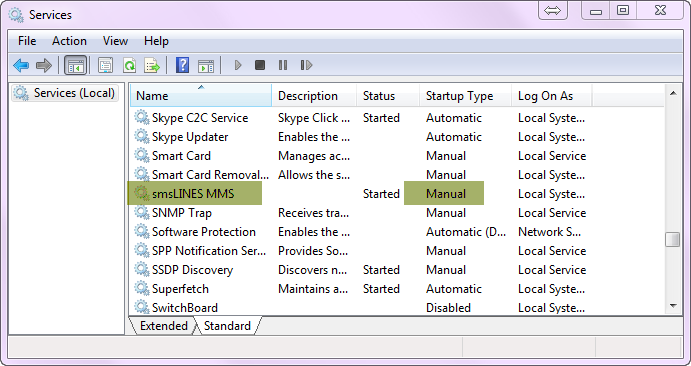
The service starts and stops automatically by the smsLINES add-in program, and it should remain as installed in "Manual". Please note that for the new service to work you must install Java as shown here
smsLINES from V8
From this release of smsPULSE and smsLINES within it, a major technology change was introduced. The change mainly affected users who enable MMS services but is also available for users of GSM with normal SMS. If you define any line to be MMS a new Windows Service will be used, and if you use SMS only you may choose to force usage of the service, through the system profile. The smsLINES MMS service is always used when you define MMS lines.
Please note that you can override the default location of the smsLINES Service by setting the environment variable SMSLINES_SVC_PATH in the server's notes.ini file. This variable makes it possible to have more then one installation of the server on the same machine (say a 32bit and 64bit servers), and at the same time share the service. For example the line in notes.ini could look like this: SMSLINES_SVC_PATH=c:\smspulse\service . This directory should contains, amongst others, the directories bin and conf. Of course the Windows Service for smsLINES MMS must have been set to the same folder.
The service starts and stops automatically by the smsLINES add-in program, and it should remain as installed in "Manual". Please note that for the new service to work you must install Java as shown here 
:
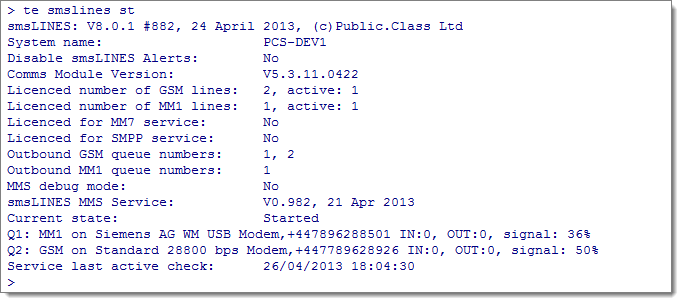
 When using the service, all the console commands are available but the way the server responds is different:
 We recommend all clients use this service instead of the previous, built-in service.
Quiting smsLINES
We recommend all clients use this service instead of the previous, built-in service.
Quiting smsLINES
 List of console command
Type "te smslines help" for the current list
Available smsLINES console commands (use the first two letters):
Use the first two letters as shortcut: "te smslines xx"
List of console command
Type "te smslines help" for the current list
Available smsLINES console commands (use the first two letters):
Use the first two letters as shortcut: "te smslines xx"
| status | Displays lines status and prods each line |
| restart | Resets or starts the communication lines |
halt
killallmsgs | Halts sending and receiving activities
Halts sending and kills all messages in sms.RAWQ db |
test n
tapi | Asks line n to send a test message if allowed
Reads the available TAPI devices |
| log | Log GSM activities to a text file |
| flush | Flush the system memory now |
help
DEbug
svcfail SendLogs zip | Shows this list
Add debug codes when sending MMS
Set the Service to FAIL (toggle)
Send modem log files, and optionally include zips |
| quit | Quit smsLINES (needed for upgrades) |
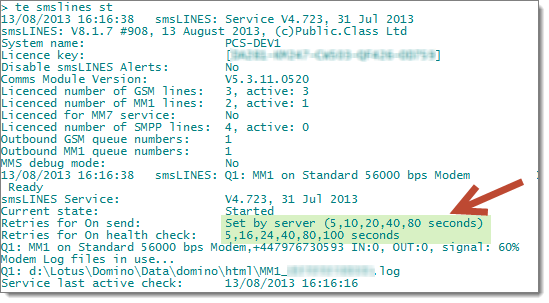
For example, to check for status type: "tell smslines st" at the server console shon above.
You may also call the above commands from the sms.ADMIN database:
 For smsPULSE console commands, see here .
Disabling Alerts
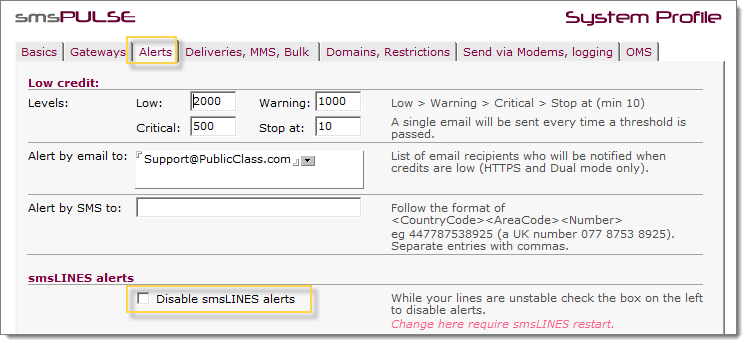
While you are working on your lines, you may wish to disable smsLINES alerts:
Web UI:
For smsPULSE console commands, see here .
Disabling Alerts
While you are working on your lines, you may wish to disable smsLINES alerts:
Web UI:
 Notes UI:
 Refine retry routines
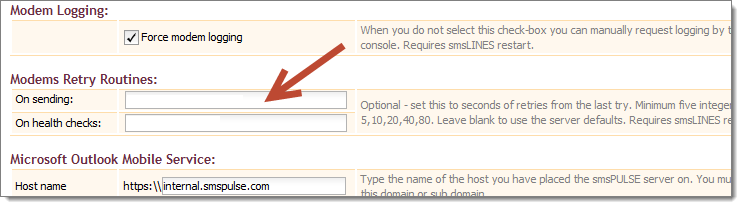
From smsPULSE V8.1.7 you can enhance the way the smsLINES retry when the service is used. This mainly applies to modems.
Refine retry routines
From smsPULSE V8.1.7 you can enhance the way the smsLINES retry when the service is used. This mainly applies to modems.
 and in the Web UI
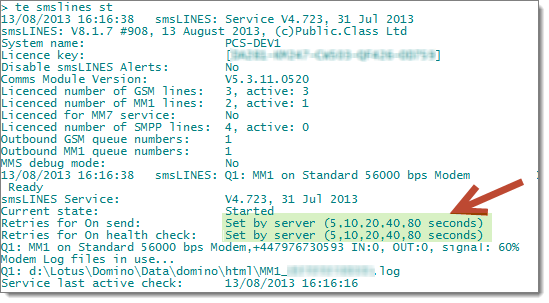
 If you ask smsLINES for status this is what it will show:
 And if you change the Health Checks to take a long time before a connection is considered defunct:
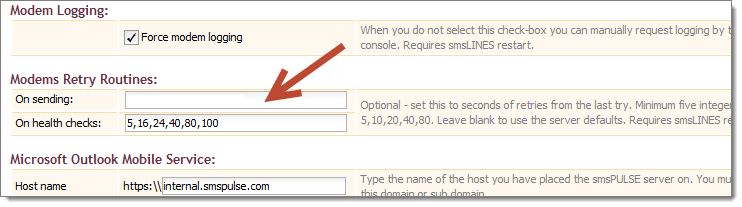 And the server reports this: